 Introduction :
Advanced Status & Navigation Bar customization, including visibility control, color/gradient styling, icon theme switching, transparency, immersive mode, and measurement support.
Compatible with hex colors and built-in color blocks.
Author: AppGineerSahil - Sahil Shelke
Category: Extension | Free & Open Source .
Latest Version: 1
Released: 16-08-2025
 Blocks & Features :
- Show / Hide / Toggle StatusBar & NavigationBar
- SetColor (Hex / Color Block) for both bars
- Set Icons to Dark / Light (status & navigation)
- Transparent, Gradient, Pulse Effects
- Enable Immersive Sticky Mode
- GetBar Heights (status, nav, combined)
- Event: SystemThemeChanged (Dark/Light mode)
 Block Documentation :
 Overview :
The AdvStatusBarTools extension provides advanced customization for Android Status Bar and Navigation Bar inside MIT App Inventor, Kodular, and similar platforms.
It allows developers to control visibility, colors (solid, hex, gradients), icon themes, transparency, immersive modes, and more.
 Events :
-
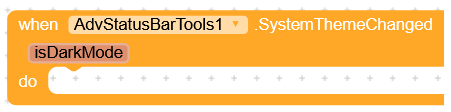
SystemThemeChanged
Triggered when the system switches between dark and light mode.
Parameter:isDarkMode(true if dark mode is enabled). -
VisibilityChanged

Triggered whenever the visibility of the Status Bar or Navigation Bar changes.
 Functions :
-
EnableImmersiveStickyMode

Enables immersive full-screen mode with swipe-to-show bars. -
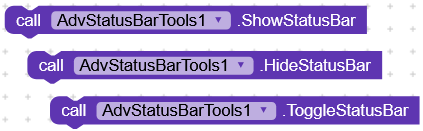
ShowStatusBar / HideStatusBar / ToggleStatusBar
Show, hide, or toggle the visibility of the status bar. -
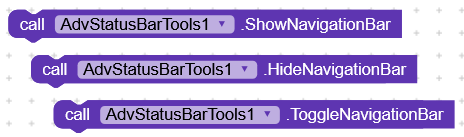
ShowNavigationBar / HideNavigationBar / ToggleNavigationBar
Show, hide, or toggle the navigation bar. -
SetStatusBarColorHex (hex)

Sets the status bar color using a hex string.
Example:"#FF0000"for red. -
SetStatusBarColor (color block)

Sets the status bar color using App Inventor color blocks. -
SetNavigationBarColorHex / SetNavigationBarColor
Same as above, but for the navigation bar. -
SetStatusBarIconsDark / SetStatusBarIconsLight

Switch status bar icons between dark and light mode. -
SetNavigationBarIconsDark / SetNavigationBarIconsLight

Switch navigation bar icons between dark and light. -
MakeStatusBarTransparent / MakeNavigationBarTransparent

Make the respective bars fully transparent. -
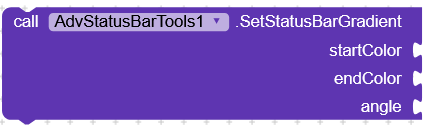
SetStatusBarGradient / SetStatusBarGradientHex
Apply a gradient effect on the status bar with color blocks or hex codes.

- Parameters:
startColor, endColor, angle (0–7)
- SetNavigationBarGradient / SetNavigationBarGradientHex
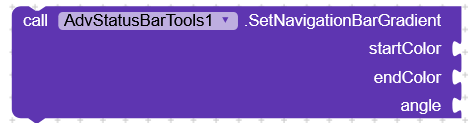
- Parameters:
startColor, endColor, angle (0–7)
- PulseStatusBar / PulseStatusBarHex
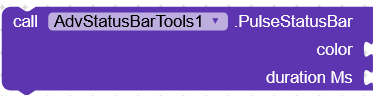
Applies a temporary glowing effect on the status bar.
- Parameters:
color, durationMs
-
ResetStatusBarColor / ResetNavigationBarColor

Resets the bar colors back to the original values. -
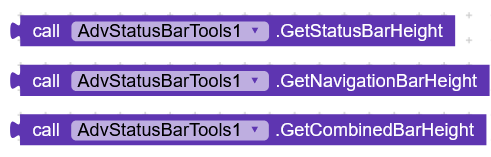
GetStatusBarHeight / GetNavigationBarHeight / GetCombinedBarHeight
Returns the pixel height of bars.
 Properties :

Returns
true/false depending on current visibility.Returns
true/false.Returns
true if system dark mode is enabled.Returns the last set color values.
 Downloads :
 AIX :
AIX :
AdvStatusBarTools_V1.aix (14.8 KB)
 Credits & Support :
Here
Thanks to you as a contributor and my new tester!
Special thanks to the App Inventor / Kodular Community 
 Android API & Permissions :
Here
- Compatible with Android API 21+ (Lollipop and higher)
- Icon color control:
- Status bar → Android M+ (API 23)
- Navigation bar → Android O+ (API 26)
- Permissions:
android.permission.WRITE_SECURE_SETTINGS(optional; required for certain OEM customizations)
 Usage Tips :
Here
- Use
GetStatusBarHeightto add top padding when using transparent bars. - Reapply style blocks inside Screen.Initialize for consistent behavior.
- OEMs may override icon color changes → always test on real devices.
 License :
Here
This project is released as Free & Open Source .
Feel free to use, modify, and contribute!
If you like this, hit the like button! If you have any suggestions, please don’t forget to leave a comment or PM me.

